Necessary
Always activeSupports security, form reliability and remembering your privacy choice. It is not used for advertising.

Hidden performance faults weaken trust, conversion paths, search visibility, and measurement long before a website visibly breaks.

Website performance issues rarely announce themselves as a complete outage. More often, they appear as a hesitant page, a delayed form, an unstable layout, or a mobile interaction that feels harder than it should. Each interruption adds friction between visitor intent and a useful business action. The technical symptom may look small, but its cost spreads across trust, inquiry quality, campaign efficiency, search visibility, and the team’s ability to measure what is actually working.
A page is delivered through a chain of dependencies: hosting, database queries, templates, media, fonts, scripts, third-party tools, browser rendering, and network conditions. A delay at one layer can amplify delays elsewhere. That is why website performance optimization should begin with the delivery path rather than a random list of plugins or compression settings.
Common website speed issues include oversized media, sitewide assets loaded where they are not needed, slow server response, render-blocking code, excessive tracking tags, and poorly controlled plugin behavior. A weak cache policy or distant delivery location can make the same page behave differently for different visitors. The result is not one universal fault but a stack of small constraints.
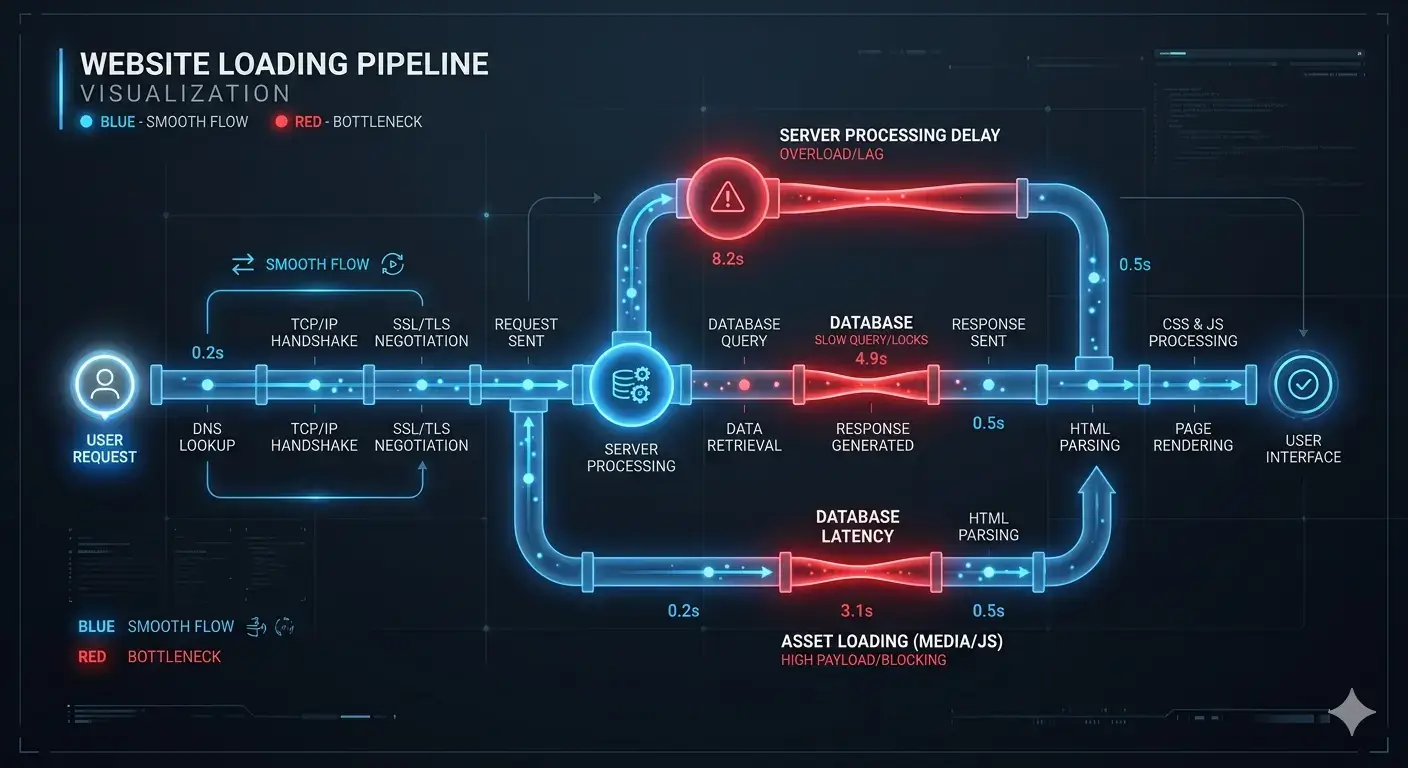
A slow loading website makes every message, proof point, and call to action harder to reach. Visitors may abandon a page before understanding the offer, lose their place after a layout shift, or hesitate when a form does not respond. The experience feels unreliable even when the underlying service is excellent. Mono’s analysis of how slow websites affect business opportunities shows why speed must be evaluated across the whole journey.
Performance also changes the economics of acquisition. SEO and paid campaigns can deliver relevant traffic, but the destination still has to preserve attention and complete the intended action. A connected website conversion system aligns message, trust, CTA flow, and capture, while technical SEO support connects crawlability and site structure to that experience. Neither can compensate indefinitely for an unreliable page.
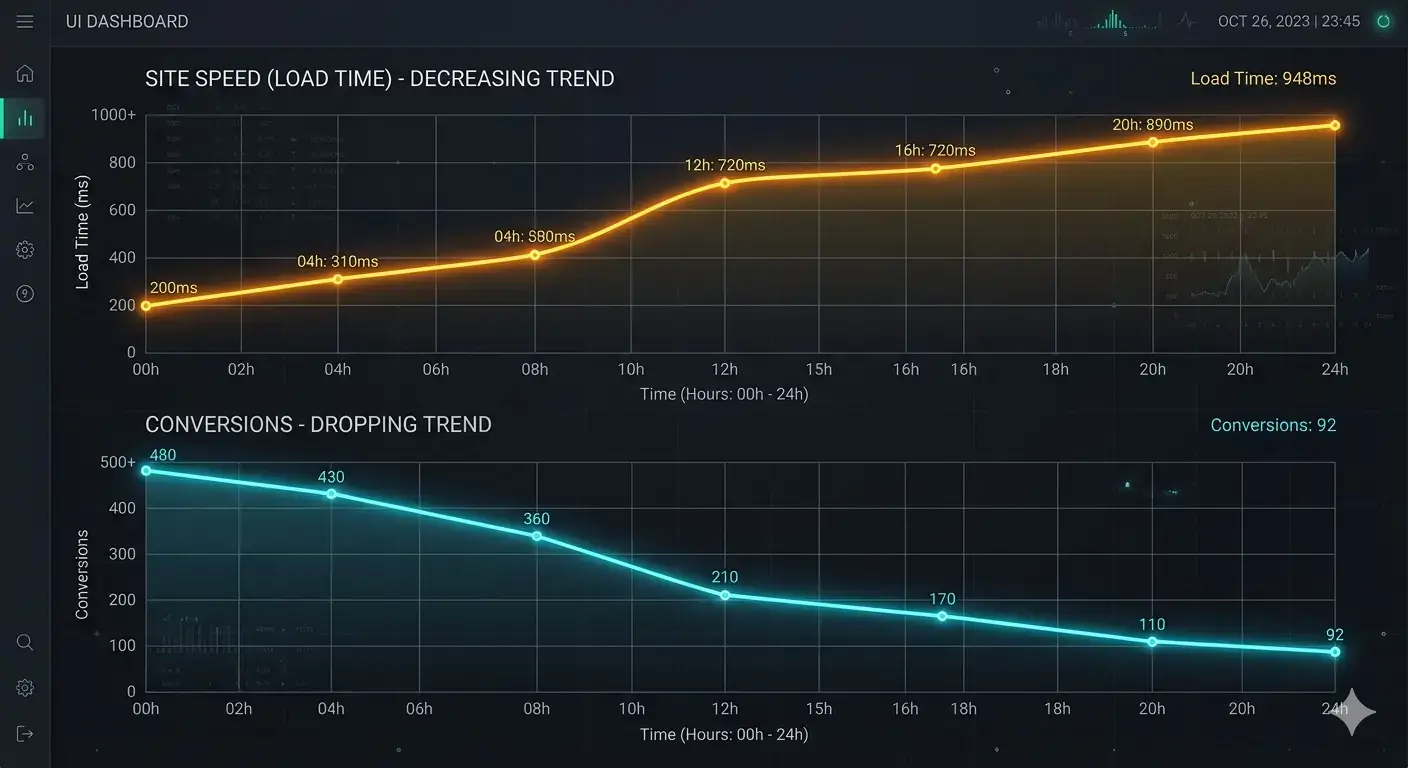
Start with representative pages, devices, and actions rather than one homepage score. Google’s Core Web Vitals guidance separates loading, responsiveness, and visual stability, which helps teams distinguish different user-facing constraints. Lab tests are useful for diagnosis, while field evidence shows what real visitors experience. Forms, navigation, validation messages, and thank-you states also need direct testing because a fast-looking page can still contain a broken conversion path.
These website performance issues should then be connected to business priority. A delay on a low-traffic archive is not equivalent to failure on a service page, booking step, or lead form. Effective conversion rate optimization focuses investigation on the moments that influence decisions, records a baseline, and verifies whether each repair improves the intended journey instead of merely changing a score.
Measurement also needs context. Compare equivalent templates, connection types, and devices; record whether the evidence comes from a controlled test or actual visits; and note which release introduced the change. This prevents teams from treating normal variation as a regression or accepting an average that hides a serious mobile constraint. The useful question is not simply whether a page is fast, but whether priority visitors can understand, interact, and complete the intended task reliably.
The safest way to improve website speed is to resolve causes in dependency order. Stabilize hosting and server behavior, remove unnecessary requests, optimize critical assets, control third-party scripts, configure caching, and then test complete journeys again. A structured website repair and optimization assessment helps preserve infrastructure that still works while identifying components that are no longer safe or economical to maintain.
Sometimes a focused repair is sufficient. In other cases, fragile templates or deeply coupled plugins make repeated patching more expensive than rebuilding the affected layer. Conversion-focused web development is appropriate when the structure itself prevents reliable performance, editing, accessibility, or measurement. The decision should follow evidence, not a blanket preference for redesign.

Websites change after launch. New campaigns, integrations, content, and tracking can reintroduce slow website problems, so ownership matters as much as the first repair. Define who reviews regressions, which journeys are monitored, what evidence triggers action, and how changes are tested. Broader digital growth infrastructure can connect website reliability with analytics, lead routing, and operational follow-up.
A practical performance budget can turn that ownership into a repeatable control. Set limits for critical assets and third-party dependencies, test representative templates before release, and document exceptions with an accountable owner. Pair automated monitoring with periodic human checks of navigation, forms, and confirmation flows. Automation can detect a regression, but it cannot decide whether the affected interaction blocks a meaningful customer decision or creates extra work for the team receiving the inquiry.
Treating website performance issues as maintained business constraints prevents teams from waiting for a visible failure. Review the real journey, prioritize the highest-value bottleneck, preserve useful assets, and verify the outcome. A focused System Review can clarify whether the right next step is monitoring, technical repair, conversion work, or a structural rebuild.
Identify the highest-value bottleneck, preserve what still works, and verify improvements across the complete customer journey.
Start a System ReviewSee Web DevelopmentArticle FAQ
Common signs include slow loading, delayed interactions, layout shifts, inconsistent mobile behavior, failed forms, heavy scripts, and pages that become unreliable after plugins or tracking tools are added.
No. A score is a diagnostic signal, not the complete experience. Review representative pages, real devices, field data, and high-value actions such as forms, bookings, navigation, and confirmation states.
Yes. Delays and unstable interactions interrupt attention, weaken confidence, and make it harder to complete an inquiry or purchase path. The effect should be verified against journey and analytics evidence.
No. Focused changes to hosting, assets, scripts, caching, plugins, or templates may be sufficient. Rebuilding becomes appropriate when the underlying structure is too fragile or costly to repair reliably.
Assign ownership, monitor important templates and actions, establish baselines, test changes before release, and review regressions whenever new content, campaigns, plugins, or third-party tools are introduced.