Necessary
Always activeSupports security, form reliability and remembering your privacy choice. It is not used for advertising.

Diagnose and repair WordPress problems including slow pages, Elementor conflicts, WooCommerce checkout or payment failures, plugin problems, broken forms, mobile layout issues, Core Web Vitals and recurring technical support needs.
The first step is diagnosis, not a full rebuild. Existing themes, plugins and infrastructure are preserved when they can be repaired safely.

Why website problems persist
A slow page may involve hosting, image delivery, scripts and layout. A broken form may involve frontend validation, email delivery, CRM integration and tracking. Random fixes can hide the symptom while creating another regression.
Website Repair & Optimization owns the path from a reproducible fault to a protected, tested and measurable website foundation.
Plugin conflicts, template overrides or deployment changes create unpredictable behaviour.
Business impact: customers and staff stop trusting the website.Heavy assets, server delay and blocking scripts affect real customer journeys.
Business impact: paid and organic traffic reaches a weaker experience.Forms, calls or WhatsApp actions are not verified across the full flow.
Business impact: decisions are made from incomplete evidence.Repair architecture
Errors, plugin or theme conflicts, broken templates, forms, WooCommerce checkout or payment flows, integrations and deployment risks.
Server response, asset weight, caching, Core Web Vitals signals and loading priorities.
Mobile layout, navigation, readability, interactive states, forms and conversion blockers.
Analytics, pixels, consent, conversion events, source context and verification.
Before and after
Performance signals
A repair is complete when the customer can load, understand and complete the important action reliably.
Review the primary content load, image delivery, server response and rendering path.
Find scripts or interfaces that delay the response after a customer action.
Prevent unstable layouts, late dimensions and moving controls.
Verify forms, calls, WhatsApp, bookings and conversion events—not only lab scores.
Engagement and scope
For an active fault, recent regression or unclear website issue.
For a defined one-off group of reliability, WooCommerce, speed or frontend issues.
For an agreed recurring WordPress care scope covering maintenance, performance checks and technical support after responsibilities and access are defined.
One controlled repair process
Confirm the issue on the affected device, template, form, workflow or integration.
Deliverable: Verified fault recordIdentify the responsible code, plugin, asset, server setting or interaction.
Deliverable: Root-cause mapPrepare backup, staging or rollback conditions before changing critical behaviour.
Deliverable: Safe repair environmentApply the smallest reliable fix and remove the conflict or bottleneck.
Deliverable: Controlled implementationRetest functionality, responsive states, forms, analytics and affected user journeys.
Deliverable: QA and verification reportRelevant experience
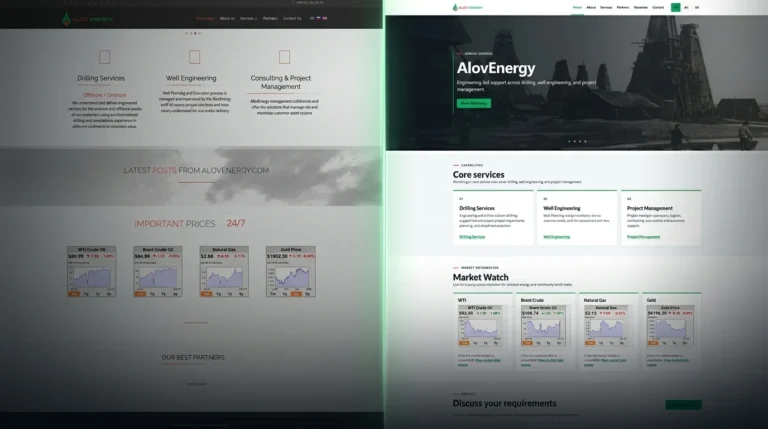
AlovEnergy's outdated Joomla website was rebuilt in WordPress with a lighter architecture, three language versions, clearer service pages, and markedly improved Lighthouse performance.
OutcomeA responsive, three-language WordPress website replaced the legacy Joomla build; the homepage achieved 100 Performance scores in subsequent mobile and desktop Lighthouse tests.
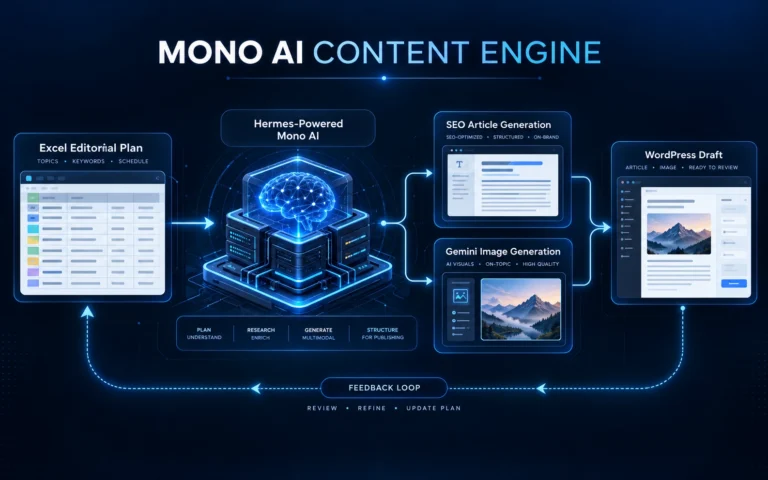
View Case StudyMono built a Hermes-powered SEO content engine that turns structured editorial plans into daily WordPress drafts, supporting visuals, and renewable publishing queues.
OutcomeEstablished a repeatable daily SEO content workflow connecting editorial planning, AI-generated articles and visuals, WordPress drafts, and content-cycle renewal.
View Case StudyMono built an AI-assisted WordPress workflow that prepares localized, SEO-validated drafts across five languages through on-demand and twice-daily scheduled automation.
OutcomeEstablished on-demand and twice-daily automated workflows for preparing validated WordPress drafts in five target languages, with editorial review retained.
View Case StudyRepair readiness
Strong fit
A rebuild may be safer
Connected capabilities
Rebuild templates or components when repair is no longer the safest option.
02SolutionImprove message, trust and CTA flow after the technical foundation is reliable.
03ServiceAddress technical SEO, crawlability and performance signals after critical faults are fixed.
Client reviews
Project feedback where technical reliability, customer experience and operational continuity were important.
“Very Professional and Exceptional service. What I liked the most was how proactive the service was delivered and how the needs of the client was understood. Thanks and Very much Appreciated!”
“Mono worked with us as a reliable white-label development partner. The implementation was clean, communication was practical and the final structure made the ecommerce journey easier to manage and improve.”
“Mono did not only build a website for us. They helped structure the full digital system around tours, inquiries, content, automation and customer communication so the business could operate more professionally online.”
“For a law office, trust and clarity are very important. Mono created a cleaner digital presence and inquiry structure that made our services easier to understand and helped clients take the right next step.”
“Hotel operations need practical digital systems, not just design. Mono helped us with the online setup, booking-related workflow and operational details in a way that was clear and useful for daily work.”
“Mono understood the logistics side of the business and built digital structure around real operational needs. The work helped us present the service better and support customer requests more clearly.”
“CargoBus needed a practical customer-facing structure connected to the service model. Mono helped turn the idea into a clearer digital flow that supports the way the service is delivered.”
“Mono helped us organize a complex certification service website into a clearer multilingual structure. The service pages, trust sections and inquiry flow became easier for customers to understand and use.”
Website Repair FAQ
Short answers to the practical questions clients usually ask before choosing the right direction.
Website repair and optimization is a focused process for existing websites that are slow, unstable, difficult to use or technically unreliable. It can include frontend or backend faults, forms and email delivery, integrations, mobile layout, CMS, theme, plugin or builder conflicts, hosting or server configuration, performance, tracking and technical SEO repair dependencies.
Mono is strongest with WordPress, Elementor, WooCommerce and related business website stacks, but the repair process is not limited to WordPress. Mono can also assess serviceable faults involving custom components, hosting or server configuration, integrations and third-party services when the issue can be reproduced and the technology is within project scope. Support is confirmed after diagnosis rather than assumed for every platform.
Yes. Forms, SMTP delivery, admin notifications, WooCommerce checkout or payment-flow faults, confirmation messages and routing logic can be investigated when the issue is reproducible and the required access is available. The goal is to verify the complete customer action and handoff rather than patch only the visible symptom.
Access depends on the fault and may include WordPress, hosting, logs, integrations or a safe staging path. Before high-risk changes, Mono creates or verifies a recoverable backup and agrees the rollback conditions so responsibilities are clear before implementation begins.
Changes are released in controlled stages and checked after deployment. A rollback path is kept for high-risk work so the previous state can be restored while the conflict is investigated.
Timing and cost depend on the affected pages, access requirements, hosting, theme, plugins and whether the fault is isolated or connected to a larger stability problem. Mono confirms the scope, expected timing and fee after the initial diagnosis.
Performance work can target Largest Contentful Paint, Interaction to Next Paint and Cumulative Layout Shift through asset cleanup, script review, caching direction, image optimization and layout stabilization. Results depend on the current stack, hosting and third-party tools, so perfect scores are not promised.
Not always. Many websites need targeted repair rather than a redesign. If the theme, builder or plugin stack can no longer be maintained safely, Mono may recommend a focused rebuild instead of adding another layer of patches.
Ongoing care is defined by agreement rather than assumed as unlimited support. It can include agreed updates, compatibility and performance checks, backup or rollback responsibilities, form or checkout verification and a prioritized improvement backlog. New features, major redesigns, content work and third-party fees remain separate unless the scope explicitly includes them.
Start with the reproducible issue
Share the affected page, device, workflow and what changed. The assessment will define the safest useful repair route.