Necessary
Always activeSupports security, form reliability and remembering your privacy choice. It is not used for advertising.

Tracking, chat and embedded tools can support growth while quietly competing with the content, interactions and measurement that matter most. The real task is deciding what should load, where, when and why.

A modern business website rarely runs on first-party code alone. Analytics, advertising pixels, consent tools, live chat, video embeds and review widgets can support real commercial goals. The issue with third party scripts website performance is that every integration also adds requests, execution work, dependencies and governance decisions the visitor never sees.
That cost matters most where attention must become action. A service page can have strong copy and a clear form, yet still feel slow because several tools compete for browser time. Mono’s website performance audit checklist therefore treats script inventory as a diagnostic task, not a cleanup detail.
Third-party JavaScript can open connections to external domains, download resources, execute code on the browser’s main thread and trigger more scripts after initialization. Google’s third-party JavaScript performance guidance explains that these integrations can affect networking, rendering and page behavior, while Chrome’s third-party performance insight recommends reducing or deferring third-party code so first-party content keeps priority.
The business question is not “Can we install this tool?” It is “Is its value worth its runtime cost on this page?”
A chat platform, tracking vendor or embedded scheduler may contact several external origins before the user interacts with it. Those requests compete with images, fonts and first-party assets that communicate the offer.
This is why LCP optimization is partly a priority problem. Loading everything early is not the same as loading the right things early.

A page may appear complete while JavaScript is still parsing or executing. That main thread blocking becomes visible when a menu hesitates, a form field lags or a button reacts late. Mono’s guide to INP optimization explains why interaction delay can surface even when loading metrics look acceptable.
Heavy third-party JavaScript is especially risky because the code is often outside your direct control. A useful performance budget should therefore include execution time, not only transfer size.
Analytics is valuable when it produces trustworthy evidence. The problem begins when website tracking scripts accumulate through old campaigns, duplicate containers, abandoned pixels and plugins that inject their own tags. The site then pays the technical cost of measurement without gaining clearer decisions.
A third party scripts website performance review should compare every tag with a current business question: what does it measure, who uses the data, and what decision would change if it disappeared? Mono’s privacy and analytics approach also shows why tracking architecture belongs alongside consent and data handling.
Chat can shorten the path to an inquiry, but poor chat widget performance can interfere with the same journey. Auto-loading launchers, animations, knowledge bases and remote assets on every page may be unnecessary when only a few pages need assisted response.
The better question is contextual: does this page need chat immediately, after intent is shown, or not at all? Mono’s guide to website integration problems shows why disconnected tools can weaken both the customer journey and the operational flow behind it.

Not every script should load at the same moment. A deliberate script loading strategy separates critical, consent-dependent, interaction-dependent and below-the-fold resources. Some tools need early initialization; others can wait until a visitor reaches the relevant component or expresses intent.
This is where a performance budget becomes operational. Instead of asking developers to “make the site faster” after each new plugin, define what a page is allowed to load and who approves exceptions.
Marketing adds a pixel. Support adds chat. Sales adds scheduling. A plugin adds analytics. Months later, nobody can explain which layer is essential. This ownership gap is one reason website performance mistakes repeat after otherwise successful fixes.
Core Web Vitals can reveal symptoms, but they do not tell the organization which vendor should be removed. Mono’s Core Web Vitals 2026 guide helps interpret the signals; governance stops the same cost returning.
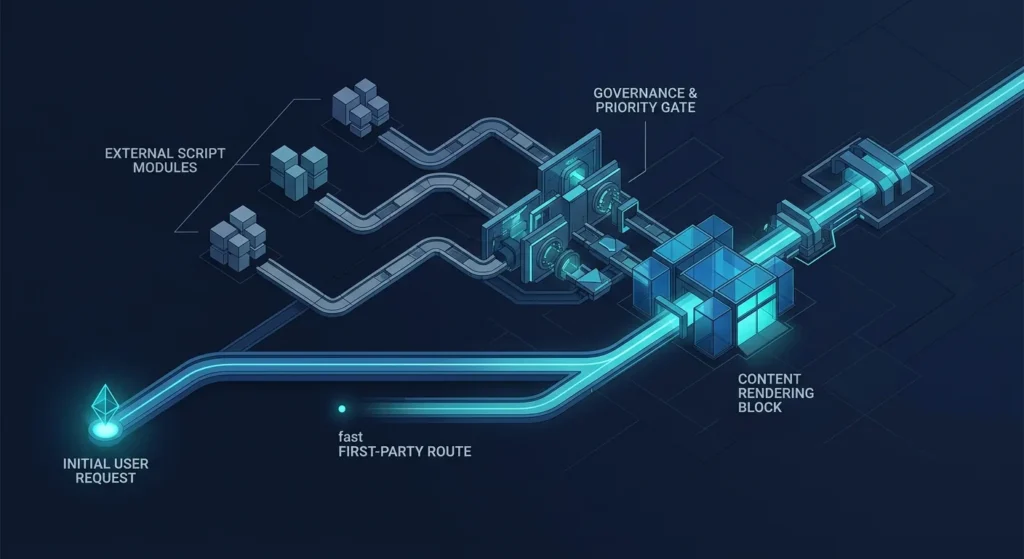
Inventory each third-party tool, then classify it by purpose, page relevance, consent requirement, loading moment and measurable business value. Test priority pages with and without suspect resources, especially pages closest to lead capture. If the stack is difficult to reason about, a focused Website Repair & Optimization review can connect performance, customer journey and measurement integrity in one diagnosis.
For organic entry pages, include technical visibility in the same review. Mono’s SEO Services framework treats technical access, page ownership and measurable organic actions as connected layers.
The goal is not to remove every external tool. It is to make each one earn its place. Treat third party scripts website performance as an ownership and prioritization problem, then verify the result on the journeys that matter. When the cause is unclear, a preselected website repair System Review provides a cleaner starting point than another generic speed plugin.
Review the pages, tools and customer actions that matter most, then prioritize the smallest fixes that protect speed, tracking and conversion.
Request Repair ReviewSee Repair ApproachArticle FAQ
Third-party scripts are code or resources provided by external services rather than the website itself. Common uses include analytics, advertising, chat, video embeds, consent systems, A/B testing and other integrations.
There is no universal worst category. Impact depends on factors such as transfer size, execution time, loading timing, additional network requests and how the vendor code behaves. Measure the actual implementation rather than judging only by tool type.
Not automatically. Keep measurement that supports active business decisions, remove obsolete or duplicate tags, and apply appropriate consent and loading rules to non-critical tracking.
It can contribute to loading or interaction problems when substantial resources are downloaded or executed early. The effect varies by implementation, so priority pages should be tested with the widget enabled and disabled.
Review them whenever significant marketing or support tools are added, after major website changes, and periodically as campaigns and vendors change. The key requirement is maintaining clear ownership of what is installed and why.