Necessary
Always activeSupports security, form reliability and remembering your privacy choice. It is not used for advertising.

Before you replace layouts, navigation, or visual identity, audit the system underneath the website — including search equity, customer journeys, conversion paths, content architecture, integrations, mobile behavior, and measurement.

A website redesign should begin with an audit, not a moodboard. A strong website redesign checklist helps you protect what already works, identify what is limiting growth, and define what the new website must improve before visual decisions begin.
A redesign can change how a website looks quickly. It can also remove valuable search visibility, weaken conversion paths, break forms, disrupt tracking, confuse returning users, or rebuild the same structural problems behind a cleaner interface.
That is why an effective website redesign strategy treats the project as a business-system change rather than a visual refresh.
Before reviewing layouts, define what the website must accomplish for the business.
Its primary role may be generating qualified inquiries, supporting sales conversations, explaining complex services, enabling bookings, or moving prospects into an operational workflow. These goals should determine the structure of the redesign.
Then identify the actions that matter most. If every page currently presents several competing CTAs, redesigning button styles will not solve the underlying issue. The new site needs a clear conversion path between discovery, evaluation, trust, and action.
Document the existing baseline before changing anything: conversion events, form routes, campaign destinations, important organic landing pages, and pages that support sales conversations.
This gives the redesign team something measurable to protect and improve.
SEO risk increases when URLs, content, navigation, metadata, or internal links change without a clear website migration SEO plan.
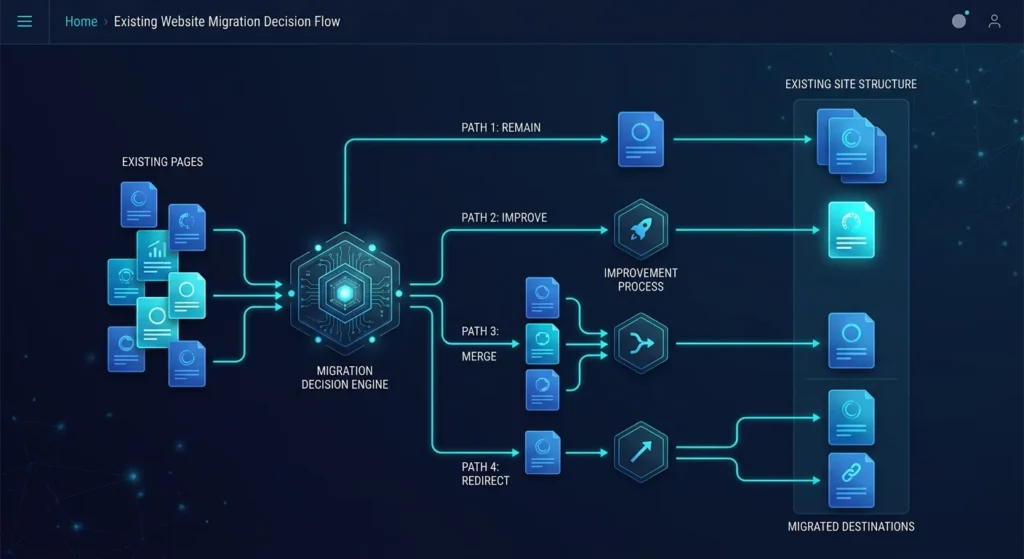
Start with an inventory of indexable pages. Decide which pages should remain, which need improvement, which can be consolidated, and which should be retired.
Preserve valuable URLs when there is no strategic reason to change them. When URL changes are unavoidable, map redirects to the most relevant replacement instead of redirecting unrelated pages to the homepage.
Review page titles, descriptions, heading structures, canonical rules, schema, image references, internal links, and XML sitemap behavior before launch.
SEO should influence architecture and content planning from the beginning. It should not become a final plugin configuration task after the redesign is already built.
A page can look polished and still make the next step difficult.
A proper website UX audit should review the complete customer decision journey: what visitors see first, what they need to understand, what creates trust, what objections appear, and what finally moves them toward action.
For every important page, ask:
This often exposes problems that visual redesign alone cannot solve: unclear positioning, duplicated explanations, weak trust signals, inconsistent CTAs, long forms, or important information appearing too late.
The redesign should remove decision friction, not simply reorganize it.

Strong information architecture determines how services, solutions, resources, and supporting content fit together.
Navigation should reflect how customers look for answers rather than how internal departments are organized.
Map the main customer intents and decide which page should own each important topic. When multiple pages compete to explain the same service or problem, users receive a weaker experience and search engines receive less clarity about page purpose.
This is also the right stage to identify outdated copy, unsupported claims, duplicate sections, obsolete offers, thin pages, and content that no longer contributes to the customer journey.
Clear page ownership makes future SEO, internal linking, measurement, and content maintenance easier.
A redesign affects much more than the frontend.
Audit forms, email delivery, CRM connections, analytics, consent tools, booking systems, payment flows, multilingual logic, search functionality, tracking events, and automation triggered by website actions.
Review mobile behavior as its own journey. Navigation, forms, content order, sticky elements, tap targets, and media often behave differently on smaller screens.
Performance and accessibility should also become design constraints before development begins. Heavy visual effects, unnecessary scripts, unstable layouts, weak contrast, and inaccessible interactions become more expensive to correct after components are approved.
For technical performance guidance, review official Core Web Vitals guidance while defining performance requirements.

A redesign should have acceptance criteria before launch week.
Create a website launch checklist covering responsive layouts, forms, links, redirects, metadata, schema, analytics, conversion events, consent behavior, browser compatibility, and critical business workflows.
Assign ownership for every high-risk check. Important redirects should have an owner. Forms should have an owner. Analytics validation should have an owner.
The project is ready when the website has a clearer business role, stronger information architecture, protected SEO foundations, reliable integrations, improved conversion paths, and measurement that can show what happens after launch.
That is the real purpose of a website redesign audit: not to slow the project down, but to prevent visual improvements from hiding structural problems that should have been solved first.
A redesign should improve more than appearance. Mono can help review your existing structure, content, UX, SEO foundations, conversion paths, integrations, and technical constraints before deciding what should stay, change, or be rebuilt.
Explore Web DevelopmentMap Conversion LeaksArticle FAQ
Audit business goals, important pages, conversion routes, SEO assets, customer journeys, navigation, content, mobile UX, performance, forms, integrations, analytics, and launch requirements before changing the interface.
Yes. Search visibility can be disrupted when valuable URLs, content, internal links, metadata, canonical signals, redirects, or crawl paths are changed without a migration plan. Google recommends preparing URL mappings and thoroughly testing site moves when URLs change.
No. If the architecture, content, and core system remain useful, targeted improvements to UX, messaging, performance, forms, or conversion paths may solve the problem with less disruption.
Record important organic landing pages, conversion events, form submissions, key CTA actions, traffic destinations, and other business-critical journeys. These create a baseline for testing and measuring the rebuilt site.
Before page structures and URLs are finalized. SEO requirements should influence information architecture, content ownership, page consolidation, internal links, redirect planning, metadata, schema, and migration QA rather than being added after development.