Necessary
Always activeSupports security, form reliability and remembering your privacy choice. It is not used for advertising.

Plan page roles, hierarchy, navigation, search intent, and conversion routes before wireframes turn assumptions into expensive rework.

Most website projects become harder than necessary because teams start with screens before deciding what the website must contain. Strong website information architecture defines the pages, relationships, priorities, and routes that should exist before visual design begins. It turns a vague redesign brief into a working model for content, UX, SEO, development, and conversion.
Mono’s website growth strategy framework starts with business outcomes, audiences, page purposes, actions, and ownership before interface decisions. A good site structure therefore answers a practical question first: what should each visitor understand or do, and which page should make that possible?
Visual design can improve presentation, but it cannot decide which pages deserve to exist. When teams skip architecture, they often discover duplicate service pages, missing decision content, unclear navigation, or conflicting CTAs after templates are built. That is why a useful website redesign strategy begins with evidence and inventory rather than new layouts.
Planning first reduces rework. Copywriters know what each page must accomplish, designers know the hierarchy they are expressing, developers know which templates are required, and SEO work can assign search intent to clear page owners. Mono’s Web Development service follows this logic by defining sitemap, section map, copy hierarchy, and interface system before implementation.

Start with outcomes, not pages. Decide whether the website must generate inquiries, bookings, product discovery, demos, qualified applications, or another measurable action. Then identify the audiences entering with different needs.
This keeps the user journey connected to a business result. A homepage, service page, case study, and contact route should each support a specific stage in the decision process.
List every proposed page and give it one primary job. A service page may establish fit and answer commercial questions. An insight may explain a problem. A case study may reduce risk. A contact page may collect the context needed for a response.
Remove pages that repeat the same purpose and add pages where an important question has no clear owner. The broader system-based website planning guide is useful here: a site structure should connect pages into a system rather than simply expand the menu.
Group pages into logical parent and child relationships, then turn those relationships into a navigation structure. W3C guidance recommends organizing content into logical sections and making site hierarchy and menus easy to understand. Its site hierarchy guidance reinforces that users should be able to predict where information belongs.
Do not design the menu around internal departments if customers think in services, problems, industries, or tasks. Strong website information architecture should make the next location feel obvious, not clever.
Every important page should answer a question that appears at a particular moment: “Is this for me?”, “Can I trust this?”, “How does it work?”, “What happens next?”, or “How do I start?”
That creates a conversion path rather than a collection of destinations. Mono’s Website Conversion System organizes message, proof, action, capture, and measurement around the visitor’s decision sequence.
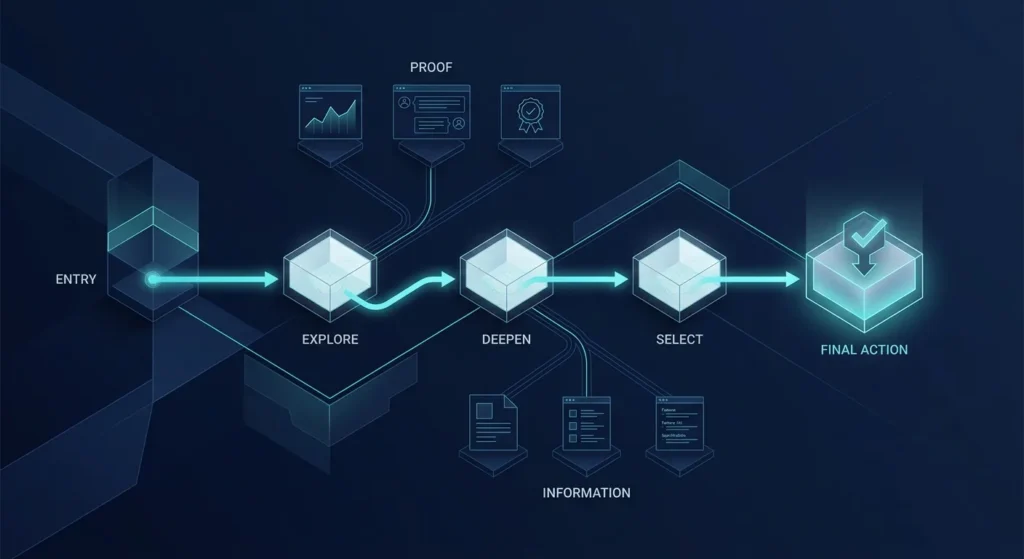
Architecture does not stop at the sitemap. Each priority page also needs a content hierarchy: what users should understand first, what proof follows, what objections must be resolved, and where the next action belongs.
This gives design a real brief. The interface can express importance through spacing, scale, order, and emphasis instead of inventing meaning visually. Mono’s guide to visual hierarchy and website trust shows why attention order matters once the page logic is clear.
SEO becomes difficult when several pages compete for the same topic or one broad page tries to rank for every service. Assign primary search intent to the page best equipped to satisfy it, then use supporting content to deepen the topic.
Mono’s SEO Services approach maps queries and buyer questions to page owners before expanding content. Internal linking should reinforce those relationships by helping users move from explanation to relevant service, proof, or action.
Breadcrumbs add another orientation layer. Google explains that a breadcrumb trail indicates a page’s position in the site hierarchy, helping users understand and explore the structure.
Walk through the planned architecture as real scenarios. Can a first-time visitor find the right service? Can a researcher move from an insight to proof? Can a high-intent prospect reach the correct action without returning to the homepage? Can the team add future content without breaking the structure?
The broader website strategy planning guide reinforces the same test: define structure, user flow, and conversion logic before design or development begins.
Good website information architecture is successful when the structure still makes sense before a polished screen exists. It gives design boundaries, SEO ownership, content purpose, and conversion logic. When those decisions are documented first, the website is easier to build, navigate, extend, and connect to the wider digital growth infrastructure behind the business.
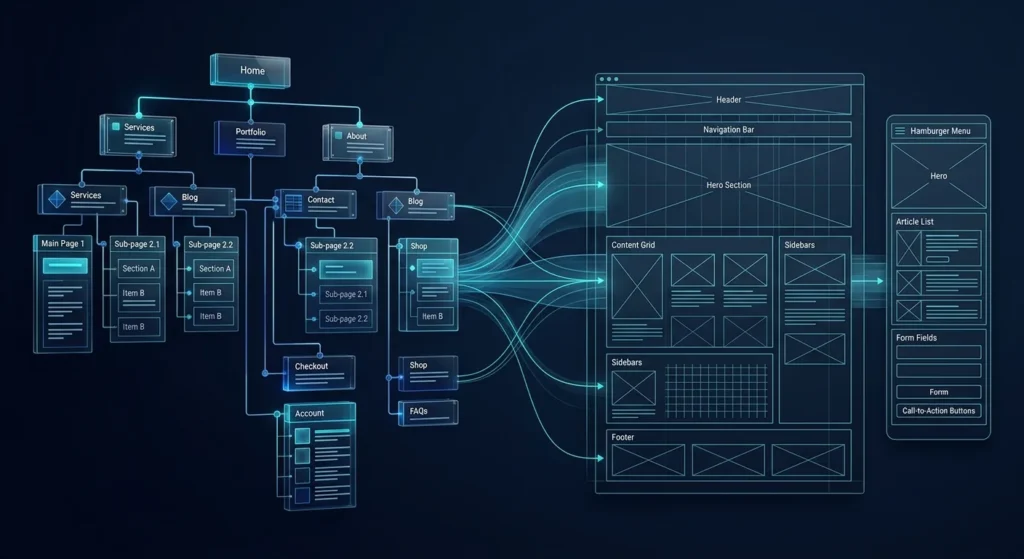
If the page roles, hierarchy, search ownership, and customer journey are clear, the next step is translating that architecture into a responsive, editable website built around real business actions.
Explore Web DevelopmentRequest System ReviewArticle FAQ
It is the planned organization of pages, hierarchy, navigation, relationships, and user routes across a website. It defines how information is structured before visual design determines how that structure looks.
Yes. Page roles, hierarchy, navigation, and important user journeys should be defined first. Wireframes can then translate those decisions into layouts instead of trying to solve structural questions visually.
There is no ideal universal number. A page should exist when it owns a distinct audience need, search intent, business purpose, or decision stage that cannot be served clearly by another page.
Architecture helps establish which pages own specific topics, how related content connects, how users and crawlers navigate between pages, and where internal links reinforce relevance.
A sitemap is one representation of the page hierarchy. Information architecture is broader: it also considers page purpose, content relationships, navigation logic, user journeys, and how people move between information and action.