Necessary
Always activeSupports security, form reliability and remembering your privacy choice. It is not used for advertising.

Improve website speed as part of a connected system that protects user experience, conversion paths, lead handling, and measurable business outcomes.

A pagespeed optimization guide is useful only when it connects technical evidence to the way people actually use a website. A fast score cannot rescue an unclear offer, an unstable mobile journey, a failed form, or a slow response after submission. For service businesses, the right objective is a page that loads reliably, explains the next step quickly, and carries qualified intent into an operational process.
Start with PageSpeed Insights, but treat its report as diagnosis rather than a finish line. Laboratory data helps isolate code, media, and rendering constraints; business performance also depends on message clarity, trust, interaction quality, and lead handling. Mono’s analysis of website performance impact shows why those layers must be assessed together.
Google’s guidance defines Core Web Vitals around loading, responsiveness, and visual stability. Those signals matter because they describe important parts of the user experience. They do not reveal whether visitors understand the proposition, notice the primary action, trust the evidence, or complete the inquiry path.
That gap explains why website performance optimization should examine representative pages and tasks, not one homepage test. Review service pages, mobile navigation, forms, confirmation states, and the handoff to the team. The recurring causes in website performance issues are often distributed across hosting, templates, scripts, media, plugins, and third-party tools.
Separate field evidence from controlled tests. Field data reflects eligible real visits over time, while a laboratory run reproduces one configured environment and can expose specific diagnostics. Compare like with like, record the tested URL and conditions, and watch whether changes improve the intended template rather than one convenient sample. Then inspect the journey itself. The reasons a website does not convert may include positioning, proof, action hierarchy, or form friction that technical tooling cannot judge. Likewise, the value of website workflow automation appears after interaction, when an inquiry must reach the right process without delay or missing context.
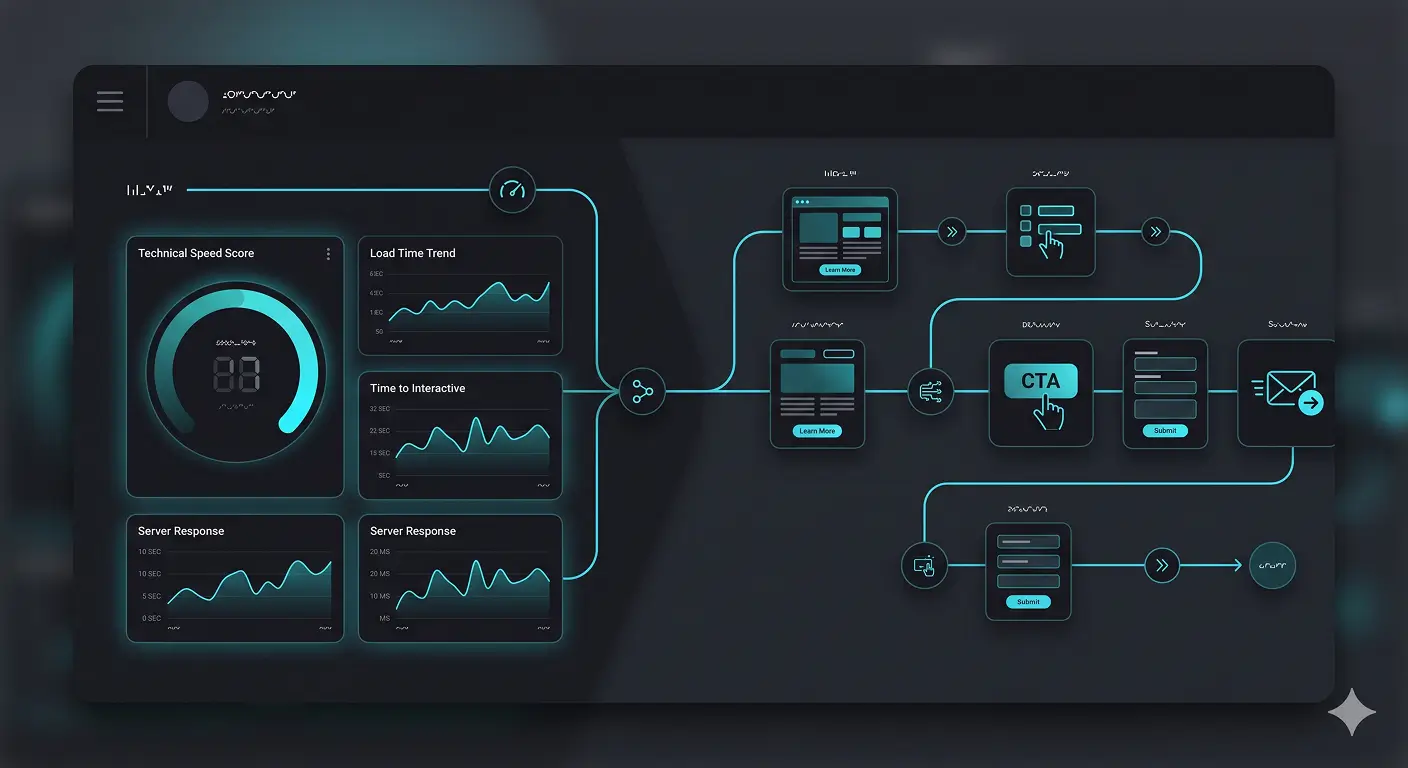
Test key templates on mobile and desktop, then identify whether delays begin with server response, oversized media, fonts, scripts, plugin behavior, or third-party requests. Fix upstream constraints before polishing isolated scores. A structured website repair and optimization assessment helps separate a focused repair from a larger rebuild.
The opening screen should clarify the audience, problem, outcome, and primary action without forcing interpretation. Poor hierarchy creates website conversion problems even when assets arrive quickly. Use the principles behind trust-building visual hierarchy to order the headline, evidence, and action around the reader’s immediate question.
Each page needs a dominant next step and contextual alternatives, not a grid of equal buttons. Keep forms proportional to the decision, explain sensitive fields, preserve entered data after errors, and confirm what happens next. A focused review of form conversion optimization can expose friction that a speed test cannot see.
Performance weakens when navigation, service content, proof, and calls to action lead in different directions. A clear website structure strategy connects discovery, evaluation, and inquiry. It also makes internal links useful decision aids rather than decorative SEO additions.

A successful form is not the end of the journey. It should create a clear confirmation, route the inquiry correctly, notify an owner, and preserve useful context. A website automation system can coordinate those steps while keeping important decisions with people. The practical goal is fewer silent failures and less uncertainty for both prospect and team.

Combine technical measurements with CTA clicks, form starts, completion states, errors, device context, and lead response ownership. A website conversion audit helps distinguish acquisition, message, trust, usability, and technical constraints. Measurement should identify the weakest stage and support a repair decision, not produce another dashboard without ownership.
Optimization can create regressions: deferred scripts may break controls, compressed media may lose useful detail, and cache changes may hide form updates. Retest loading, navigation, consent, tracking, forms, confirmation, notifications, and routing as one sequence. This is where a pagespeed optimization guide becomes operational: every technical change is checked against the customer journey it is meant to improve.
Not every weak score demands a rebuild, and not every fast page performs well. Prioritize blockers by user impact, commercial importance, and dependency. Preserve working infrastructure, repair the weakest layer, and retest before expanding scope. That approach turns real website performance into a manageable operating discipline.
The final lesson from this pagespeed optimization guide is simple: speed supports revenue when it strengthens clarity, trust, action, and response. Connect the evidence to a deliberate journey, then evaluate the wider website revenue system rather than treating a score as the outcome.
Review the complete journey before choosing between a focused technical repair, conversion improvement, or structural rebuild.
Request a System ReviewView Web DevelopmentArticle FAQ
Use it to identify loading, rendering, responsiveness, and stability constraints. Confirm those findings on representative devices and pages, then relate them to the tasks visitors must complete.
Yes. Unclear messaging, weak hierarchy, missing proof, confusing navigation, difficult forms, or unreliable follow-up can interrupt the journey even when pages load quickly.
Prioritize commercially important templates and journeys where technical friction blocks discovery, evaluation, inquiry, booking, or another meaningful action.
Retest the complete path across relevant devices: loading, navigation, consent, tracking, forms, confirmation, notifications, and lead routing. This catches regressions that an isolated score may miss.
Repair is usually the better first step when the core platform and content remain useful and the main constraints can be isolated. Rebuilding becomes more appropriate when architecture, maintainability, or journey logic is fundamentally unsuitable.